Everything it does, and who it is for.
Nine modules every shop gets, and five that are switched on only for the trades that use them. Each one says which industries it belongs to.
Which features belong to which trade.
The application decides this from your business type, not from a sales conversation. A kitchen screen is offered to a restaurant and never to a pharmacy.
| Module | Trades | Industries |
|---|---|---|
| How the order is served | 10 | Food and drink (10) |
| Kitchen | 10 | Food and drink (10) |
| Delivery and riders | 7 | Food and drink (7) |
| Online selling | 17 | Food and drink (6), Retail (9), Health, beauty and fitness (1), Trade and wholesale (1) |
| Service orders | 24 | Food and drink (1), Retail (4), Health, beauty and fitness (8), Services and repair (8), Leisure and hospitality (3) |
Sell
The till is the screen your staff live on, so everything an order needs sits in one panel. How it is served, who it is for, hold, discount, note, quote and void.
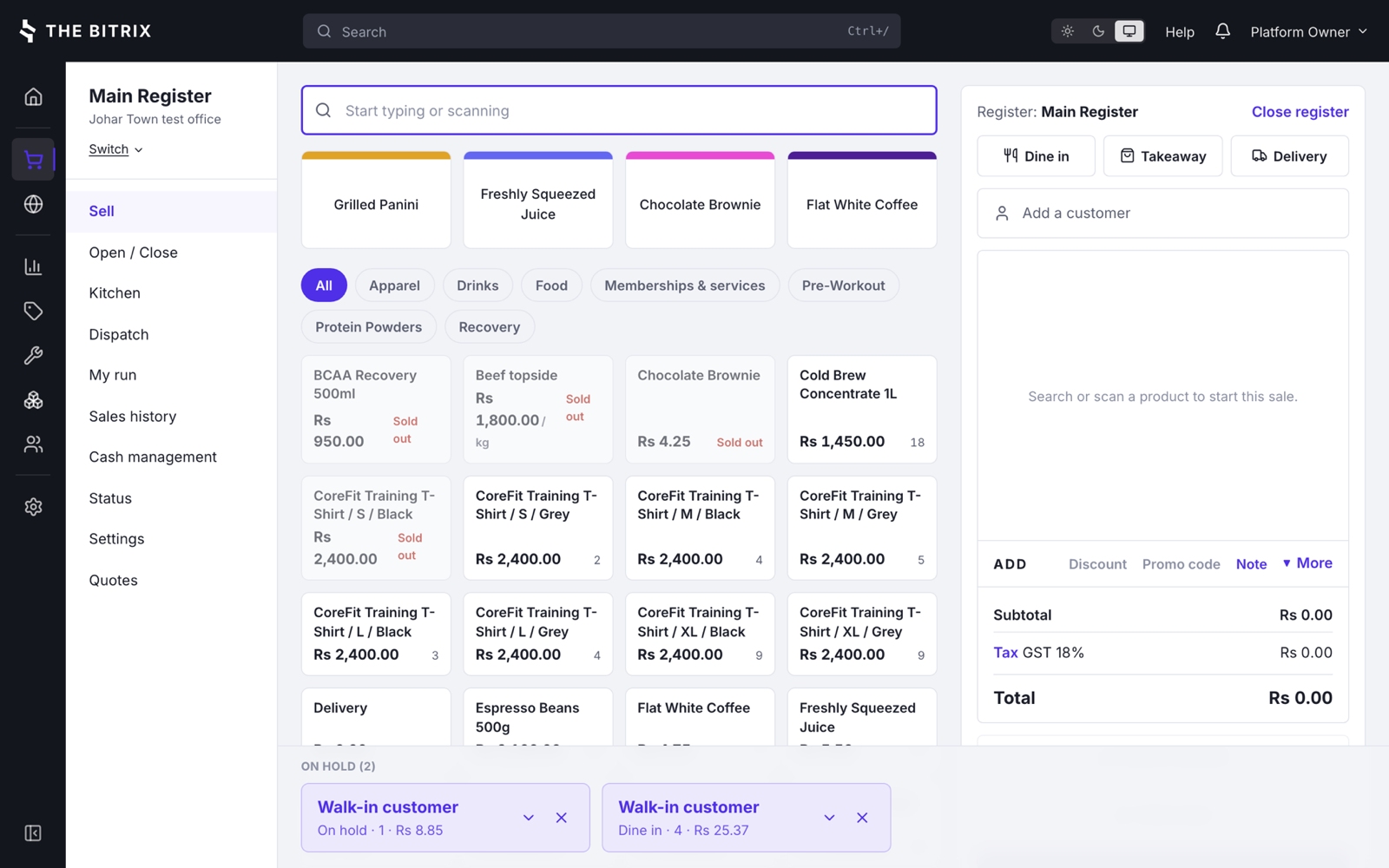
Search or scan on the left, the order on the right, held orders along the bottom.
Find anything fast
Search by name, SKU or barcode, browse categories, or scan. Variants resolve to one sellable row, so stock is never ambiguous.
Held orders and quotes
Held orders run along the bottom of the till as cards showing the customer, the units and the total. Discarding one voids it with a reason rather than deleting it.
Discounts inside a ceiling
Line and order discounts, capped per role and enforced on the server, not only in the interface.
Split payments
Cash, card, gift card, store credit, on account and payment types you define, in any combination on one sale.
Card payments
Merchant accounts for Stripe, Square and PayPal, a hosted redirect option, and a manual terminal mode for shops that key the amount in themselves.
Refunds that name the sale
A refund carries the sale it reverses, appears in history while it is still awaiting tender, and can always be finished.
Open and close
Opening float, cash movements in and out, a counted close with variance, and a note required when the drawer disagrees.
Receipts
Printed over ESC/POS at the register and reprinted from history, showing what was actually charged rather than what the price list says today.
Weighed goods
Embedded barcodes from a scale, carrying either the price or the weight, with scale label settings per shop.
Sign in at the till
PIN entry for staff on a shared register, idle auto lock, and a rule that the register closes before anyone logs out.
How the order is served
Only trades whose orders are served rather than handed over a counter are asked this, and each is offered the styles it actually works in. A food truck is always takeaway, so it is not asked at all.
Chosen at the top of the cart
One decision before the order is built, because it changes the kitchen slip and the delivery fee.
The styles come from your trade
A restaurant offers all three, a cloud kitchen takeaway and delivery, a bakery takeaway and delivery. A pharmacy is never asked.
It rides with the order
A held order reads Takeaway with its units and total rather than a bare On hold, and it survives being parked and picked back up.
Enforced on the server
A gym's till cannot be given a dine in order through the API, whatever a client sends.
Kitchen
Orders reach the pass as screen tickets, printed slips, or both. Stations are seeded for the trade, so a bakery does not start with a restaurant's line.
Kitchen screen
Tickets in order, bumped when they are done, with the order type and the customer on the card.
Prep stations
Items routed to grill, cold, bar or bakery, with a slip per station instead of one long ticket.
Printers that retry
A print queue that survives a printer being offline, with the job still waiting when it comes back.
Sent when you want it
On the order, or only once payment is taken, decided per shop.
Late tickets
A ticket that has waited longer than the shop's threshold is flagged rather than lost in the list.
References
Ask for a table or a name as the ticket is sent, so the pass knows where the food is going.
Delivery and riders
For shops that send orders out, delivery is a board rather than a phone call: who is out, what they carry, and what they owe when they get back. Available to any trade, switched on by default for the ones that deliver.
Dispatch board
Orders waiting, assigned and on the road, grouped into runs for a rider.
Riders
Staff or contractors with their own sign in and a screen showing only their run.
Zones and fees
Delivery areas with their own charge, applied at the till and online.
Customer tracking
A link sent by SMS, WhatsApp or email when the order is placed and again when it leaves, opening a public page that shows nothing else. Messages that fail are logged with the provider's own error.
Cash settled
Cash collected on the road is reconciled against the run when the rider returns, and a shortfall raises a notification.
Catalog
The catalogue is where most migrations go wrong, so imports keep your cost prices and the fields other systems export are read under the names they actually use.
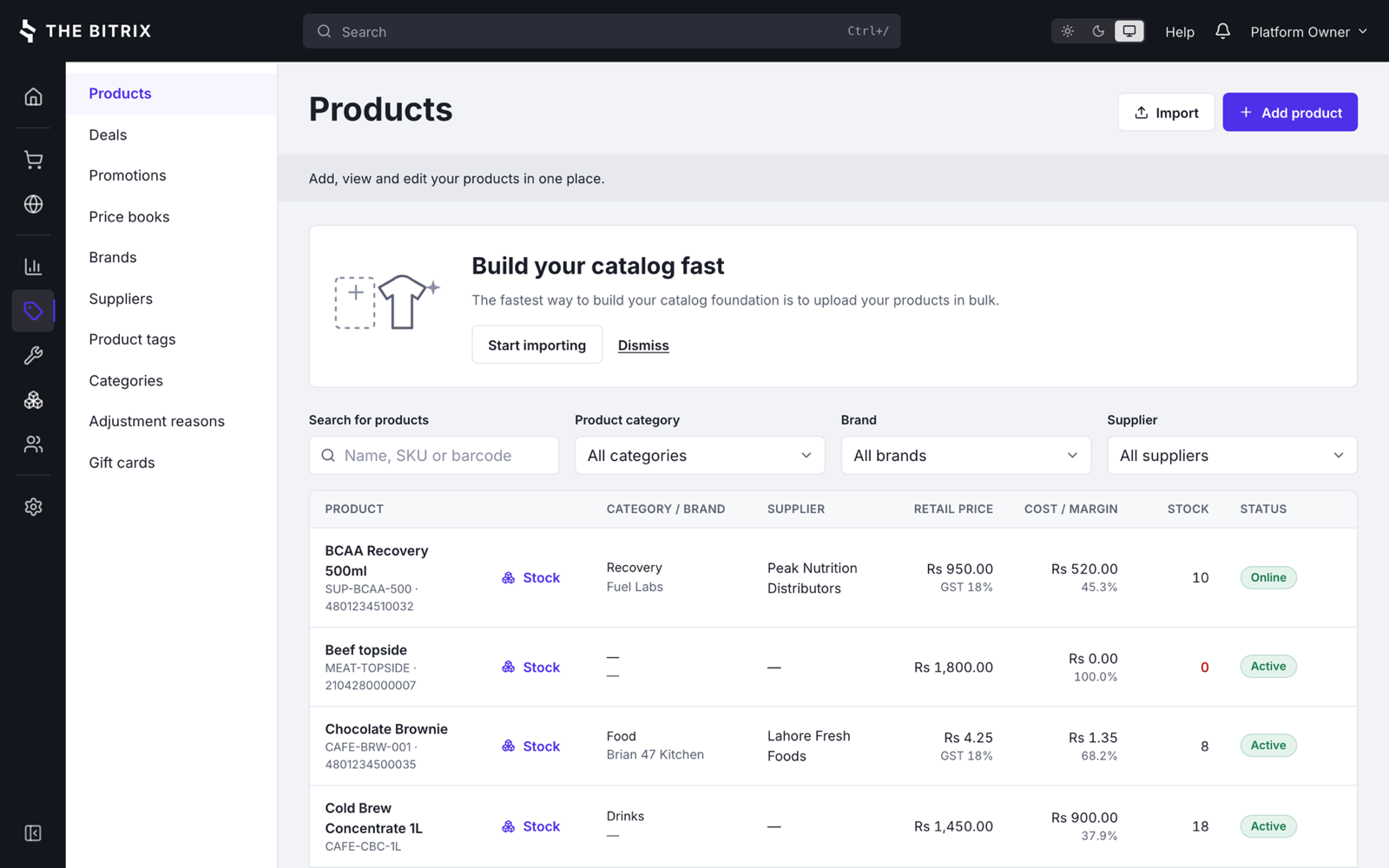
Cost and margin sit beside the retail price, for the roles allowed to see them.
Products and variants
A variant is a sellable row of its own, so stock, barcodes and sale lines all point at the same thing.
Deals and composites
Meal deals and bundles that draw their components off stock.
Promotions
Timed offers with their own rules, separate from ad hoc discounts at the till.
Price books
Different prices per outlet or customer group, from one catalogue.
Gift cards
Issued, topped up, redeemed and reported, with a balance that is a real ledger.
Brands, suppliers, tags
The master data the reports group by, kept beside the products.
Import and export
CSV in both directions. Cost is read from cost, cost_price or supply price, because a catalogue imported at zero cost reports every margin at 100 percent.
Images
Product photos for the till, the kitchen slips and the online catalogue.
Inventory
Six screens, one ledger. Nothing changes a quantity without writing a movement, which is why the balance and the audit trail cannot disagree.
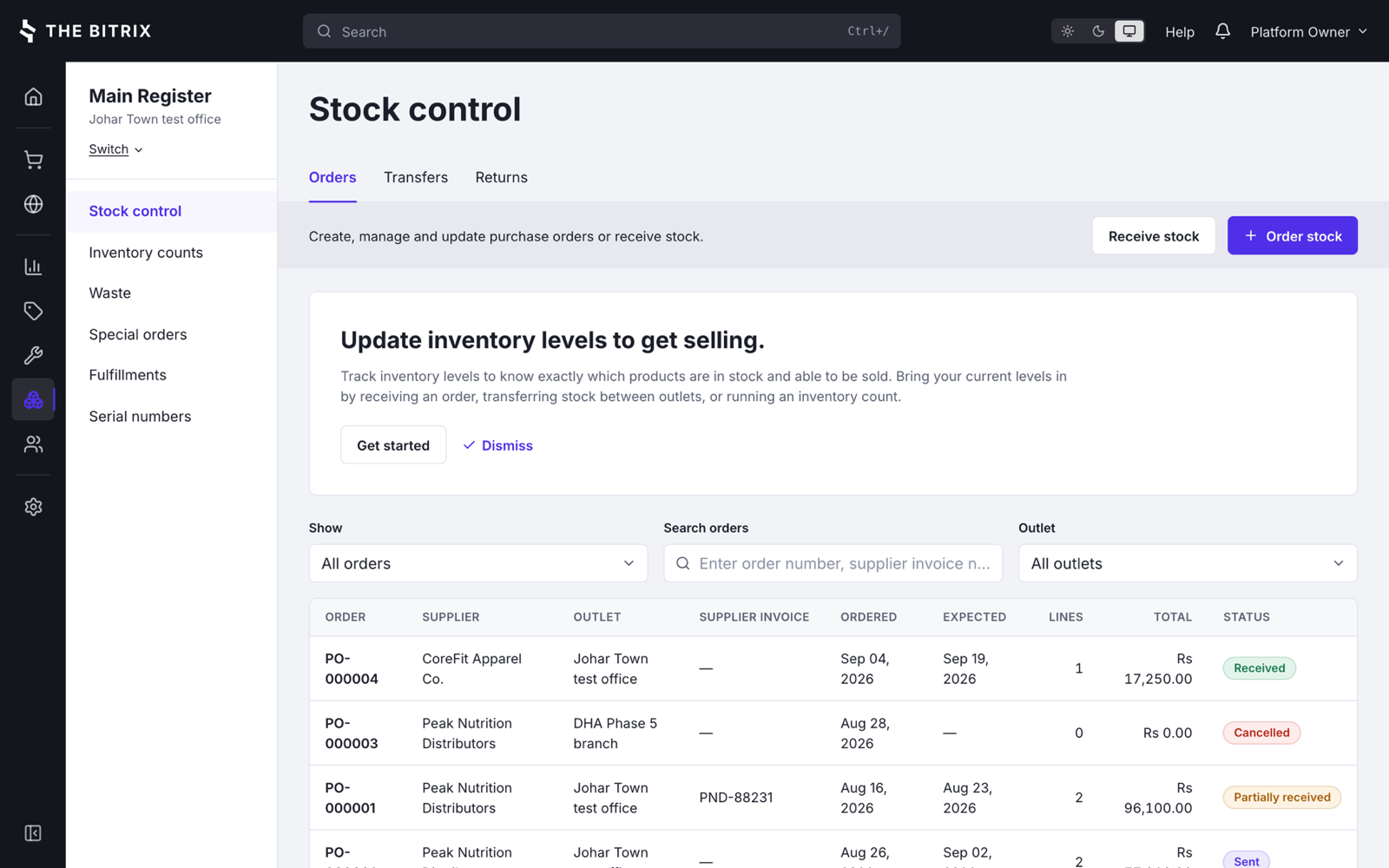
Purchase orders, transfers and returns, each with the state it is actually in.
Stock by outlet
Quantities, reorder points and low stock warnings for each place you trade from.
Purchase orders
Raised against a supplier, received in full or in part, with real discrepancies recorded rather than silently accepted.
Transfers
Between two different outlets, with both sides of the move in the log.
Counts
Stocktakes that produce a correction with a reason and an author, not an untraceable overwrite.
Waste
Wastage recorded as it happens, which is what makes a perishable trade's margins believable.
Serial numbers
Tracked in and out for the goods that need it, and attached to the sale.
Special orders
Items ordered in for a named customer, and followed until they are collected.
Costing
Weighted average cost, and a shop level decision on whether negative stock is allowed at all.
Or none of it
A trade that holds no stock, such as dry cleaning, is provisioned with stock tracking off and the screens stay out of the way.
Customers
One customer record behind the till, the website and the workshop, with the balances that come with it.
Profiles and groups
Contact details, history, and groups that price books and reports can use.
Duplicate detection
The second record with the same number is caught while it is still one record to fix.
Loyalty
Earn rate, minimum redemption and optional expiry, accrued when the sale completes. On or off per shop.
Store credit
A real balance that refunds can go to and future sales can draw on.
On account
Sales against a credit limit, with the limit enforced at the till.
Access is a permission
Customer data can be restricted to the roles that need it, and the restriction holds through the API.
Online selling
The same catalogue and the same stock, published to your own site, with orders landing beside the walk-in trade rather than in a separate inbox.
Publish the catalogue
Choose whether stock counts are exposed, and which outlet fulfils online orders.
Orders in one queue
Accept them by hand or automatically, and fulfil them from the inventory screens.
WordPress plugin
A storefront plugin for the site you already have, rather than a second website to maintain.
Storefront API
Keys and an embeddable storefront for sites that are not WordPress.
Pickup, delivery, shipping
Per shop, with a default carrier for the parcels that go by post.
Ways to pay online
Pay on collection, cash on delivery, or a card through your merchant account.
Service orders
For trades where the customer leaves something behind, or books time rather than buying an item: a car, a suit, a laptop, a treatment, a class.
Intake and quote
What came in, what it needs, what it will cost, agreed before the work starts.
Parts and labour
Parts drawn off stock at cost and labour as its own line, on one job.
Status
Where every job is, so the question on the phone has an answer.
Collection
Handed back and paid for at the same till as everything else.
Memberships and appointments
The same order carries a class, a treatment or a month of membership for the trades that sell time.
Reporting
Each response carries the definition of the metrics it returns, so the arithmetic is visible rather than assumed, and saved reports keep the ones you run every week.
Sales
Revenue, transactions, customers and gross profit, by period, outlet, register or staff member.
Inventory and adjustments
What is on hand and what it is worth, and every movement that changed it.
Cash and payments
Movements in and out of the drawer, takings by payment type, and register closures with their variances.
Tax
What was charged, at which rate, on which sales, at the rate that applied on the day.
Gift cards and store credit
Issued, redeemed and outstanding, because both are money you owe.
Staff
Who sold what, discounted what, and voided what.
Saved and shared
Keep a report you run every Monday, and share it with the people who need it.
In your timezone
Days, weeks and months are bucketed in the shop's timezone rather than the server's.
Setup
Twenty eight setup screens, a readiness checklist that tells you what is still missing before you go live, and an audit log of who changed what.
Outlets and registers
Places you trade from, the tills in them, and the shifts they run.
Taxes
Rates, rules, and tax exclusive or inclusive display honoured end to end. A completed sale keeps the rate that applied at the time.
Payment types
Cash, card, vouchers and anything else you take, with merchant accounts behind the ones that need a gateway.
Devices
Registers, printers, scales and customer displays, named so support can talk about them.
Roles and permissions
77 permissions in 8 sections. Each shop owns its own roles, seeded from a template and free to be rewritten.
Staff
Users, their role, their outlet and their PIN.
Notifications
Fourteen events you can switch on or off per shop: a till that did not balance, a rider short on cash, a printer that stopped answering, a product at its reorder point.
Customer messages
SMS, WhatsApp or email providers, with credentials stored write only and a log showing every message sent and the provider's own words for any that failed.
Feature switches
Kitchen, delivery, order types, services, online and loyalty, on or off per shop, offered only where the trade can use them.
Audit log
Configuration changes, permission changes and support visits, with who, when and from where.
Security
The permission list drives both the navigation and the routes, so taking a section away from a role hides it and refuses it.
Two factor
Time based codes from any authenticator app, enforced for a whole shop when you choose.
PIN at the till
Fast switching between staff on a shared register without handing out passwords.
Sessions
Timeouts, idle auto lock, and a rule that the register closes before anyone logs out.
Enforced twice
The same permission decides the menu and the API route, so a stale link returns a plain refusal rather than data.
Support visits are recorded
An operator entering a shop to help is announced in the interface and written to the audit log with a reason.
Languages and money
Language and currency belong to the shop rather than the installation, so one system runs a bakery in Lahore and a cafe in Krakow at the same time.
Right to left
Arabic, Urdu, Persian, Hebrew and Pashto mirror the whole layout, including the navigation rail and form controls.
Honest about coverage
15 languages are fully translated and the picker says which. An untranslated phrase stays readable English rather than breaking the screen.
Currency precision
Yen has no minor unit and the Gulf dinars have three. Rounding comes from the currency rather than being fixed at two.
Per person
A staff member can choose their own language. Leaving it unset follows the shop.
Several shops at once
The same installation runs many shops with a console above them, for a chain, a franchise, or a reseller selling the software on.
Tenants
Provision a shop, change its plan, suspend it, restore it, or enter it to help.
Plans and limits
Outlets, registers, users and products capped per plan, enforced when the resource is added and explained on the spot.
Billing
A monthly cycle that invoices, chases and suspends, safe to run every night because it acts only on what is genuinely due.
Payments recorded
How the money arrived is recorded against the invoice. Connect a gateway when you are ready.
Suspension is recoverable
A suspended shop keeps its data and its billing page, so it can pay and restore its own access.
Overview
Recurring revenue, collections, what is overdue, and what needs attention today.
See it with your own catalogue.
The trial is the full software. Import a CSV of what you sell, ring up a sale, close the register and read the report it produces.